Oolite build system
Here is the result of this forum thread: gitversion.sh / meson.build changes
Oolite will get built in different scenarios: Developers obviously download the source code from the central repository, apply changes and eventually push their changes back to the repository. Likely they will not run the complete packaging for multiple operating systems. That is where the CI pipeline kicks in on Github: every push triggers a CI build which builds Oolite, performs standard tests and packages it in various formats such that it can easily be used by others. This will work for a defined set of operating systems. Distro packagers like the AUR build will create even more comfort for users by creating OS distribution specific packages. It means Oolite can be installed through the operating system's package managers.
Below you find activity diagrams and a table explaining the purpose of each step. Note that each step may require items to already exist and on the other hand may provide output to other steps.
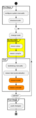
Developer
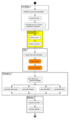
CI (on Github)
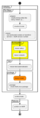
AUR Packager


| Build Step | Description | Requires | Provides |
|---|---|---|---|
| configure system manually | A developer will maintain his development system will all the required tools and dependencies to build Oolite. Should be supported by scripts. | nothing | configured system |
| checkout code | Clone and checkout from the Oolite git repository so it resides in the local filesystem. | configured system | working tree |
| change code | A developer will change code in the local filesystem to whatever extent. | working tree | modified working tree |
| meson setup | working tree | meson configuration files | |
| meson compile | meson configuration files | compiled and linked output in the build directory | |
| test/debug manually | A developer will test manually, focusing on the changes he/she applied. | compiled and linked output in the build directory | nothing |
| meson test | runs predefined tests | compiled and linked output in the build directory | error log and return status code |
| meson install | copies Oolite files to another location on disk | compiled and linked output in the build directory | files in new output location |
| meson uninstall | reverse opertion for meson install. Removes the files from the new output location | files in new output location | nothing |
| push changes | Push the changes back into the Oolite repository. Likely involves commit and pull request actions. | modified working tree | unmodified working tree |
| configure system automatically | Similar to the `configure system manually` step, in CI builds all this has to be scripted. | nothing | configured system |
| calculate version number | Generates the checked out version's semver. | working tree | |
| generate tar.gz | Generates an Oolite distribution as tar ball. | compiled and linked output in the build directory | the tar.gz file |
| generate AppImage | Generates a Linux AppImage. | the tar.gz file | the AppImage |
| generate Flatpak | Generates a Linux Flatpak image. | the tar.gz file | the Flatpak |
| generate MSIX | Generates a Windows installer for Oolite using MSIX. | the tar.gz file | the MSIX package |
| generate NSIS | Generates a Windows installer for Oolite using NSIS. | the tar.gz file | the executable installer |
| tag source code | The CI run will tag the version in the official repository so it is available to all other steps. | the version number | tagged git revision |
| upload artifacts | Uploads generated artifacts to a Github Release so they are available to the public. | any kind of artifact | artifacts attached to the release on Github |
| prepare | Similar to the `configure system automatically` step, this step will prepare an AUR build environment to build Oolite. | nothing | configured system |
| pkgver | Checks the version tag of the local source code and transforms it from semver to an AUR package version number. | working tree | version used by archlinux pacman (package manager) to track installed packages |
| package | Generates the AUR package. | tarball with files the application needs in a format designed for use by pacman | |
| publish on AUR | Pushes the AUR package into the AUR repository. | write access on aur package repo for oolite / oolite-git package | shares recipe (PKGBUILD) to build oolite / oolite-git packages on archlinux user systems |
   {
       "builder": "unknown",
       "title": "Oolite core",
       "version": "1.93.1-190",
       "source": "https://github.com/OoliteProject/oolite/releases/tag/1.93.1-190",
       "built-at": "2026-07-12T19:59:09+0200",
       "identifier": "org.oolite.oolite",
       "required_oolite_version": "1.93",
       "license": "GPL 2+ / CC-BY-NC-SA 3.0 - see LICENSE.md for details",
       "author": "Giles Williams, Jens Ayton and contributors",
       "information_url": "https://oolite.space/",
       "expansion_catalog": "https://addons.oolite.space/api/1.0/overview/"
   }

